На сайте 127211 инструкций общим размером 515.03 Гб , которые состоят из 6436472 страниц
Фото
Руководство пользователя M-AUDIO CO2. Основные функции, характеристики и условия эксплуатации изложены на 2 страницах документа в pdf формате.
Доступно к просмотру 2 страницы. Рекомендуем вам скачать файл инструкции, поскольку онлайн просмотр документа может сильно отличаться от оригинала.
™    Coaxial-to-Optical
CO2                         Optical-to-Coaxial                  Features
and
Converter                       ? Converts S/PDIF optical-to-coaxial and
coaxial-to-optical, simultaneously.
? "Thru" ports may be used to extend the length
Ver: CO2 073102
of coaxial or optical runs.
? Three selectable modes of operation.
Introduction
? Optical (Toslink) and RCA (coaxial) inputs
Thank you for your purchase of the M-Audio CO2 Coaxial/            and outputs.
Optical Converter. CO2 is a compact but rugged S/PDIF tool       ? Power indicator LED.
that simultaneously converts S/PDIF signals from optical-to-
coax, and coax-to-optical. CO2's innovative 2-in 2-out design    Specifications
allows it to operate as a full-duplex bidirectional converter,
or as a half-duplex converter with "thru" port. This enables     ? Inputs: 1 Toslink optical and 1 RCA coaxial jack.
the CO2 to be used as a converter and a repeater.                ? Outputs: 1 Toslink optical and 1 RCA coaxial
jack (transformer-isolated).
? Power supply: 9 Volts DC, center pin positive,
Operation                                                          300 milliamps.
? Dimensions: 3.5" x 2.3" x 1.2".
Plug one end of the included power adapter into the CO2's
? Approximate weight: 7 ounces.
power jack and the other end into a live wall socket or
power strip. The power indicator LED on the side of the CO2
will light.  Next, choose the CO2's mode of operation by
setting the slide switch in the side of the CO2.              For best results, when using the CO2 RCA jacks, use a
good-quality S/PDIF cable.  The cable should be coaxial
NOTE:  The CO2's mode switch has been intentionally recessed  with 75-ohm impedance.  Vendors sell cables specifically
in order to prevent accidental mode switching.  Use a pen or  for this use, but a good-quality video dubbing cable also
similar object to set the switch position.                    has the proper characteristics.
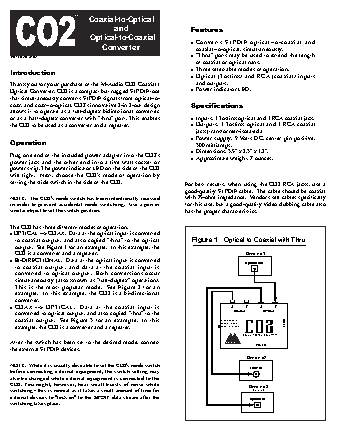
The CO2 has three different modes of operation:
? OPTICAL --> COAX.  Data at the optical input is converted
to coaxial output, and also copied "thru" to the optical        Figure 1 - Optical to Coaxial with Thru
output.  See Figure 1 for an example.  In this example, the
CO2 is a converter and a repeater.                                                 Device #1
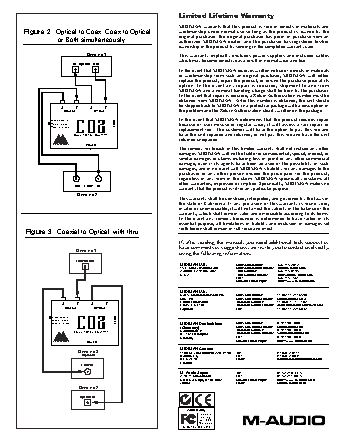
? BI-DIRECTIONAL.  Data at the optical input is converted
Optical Out
to coaxial output, and data at the coaxial input is
converted to optical output.  Both conversions occur
simultaneously (also known as "full-duplex" operation).
This is the most popular mode.  See Figure 2 for an
example.  In this example, the CO2 is a bi-directional
converter.
? COAX --> OPTICAL.  Data at the coaxial input is                              ^     ^    ^     ^
COAXIAL    OPTICAL
converted to optical output, and also copied "thru" to the
coaxial output.  See Figure 3 for an example.  In this                     COAX ?  OPTICAL
BI-DIRECTIONAL         9VDC
example, the CO2 is a converter and a repeater.                            OPT ICAL?  COAX  CO2
COAXIAL /OPTICAL CONVERTER
After the switch has been set to the desired mode, connect                   AUDIO
POWER
the external S/PDIF devices.
Device #2
NOTE:  While it is usually desirable to set the CO2's mode switch
Coax In
before connecting external equipment, the switch setting may
also be changed while external equipment is connected to the
CO2. You might, however, hear small bursts of noise while
Device #3
switching - this is normal as it takes a small amount of time for                      (optional)
external devices to "lock on" to the S/PDIF data stream after the
Optical In
switching takes place.
Limited Lifetime Warranty
MIDIMAN warrants that this product is free of defects in materials and
Figure 2 - Optical to Coax, Coax to Optical,           workmanship under normal use so long as the product is: owned by the
original purchaser; the original purchaser has proof of purchase from an
or Both simultaneously                     authorized MIDIMAN dealer; and the purchaser has registered his/her
ownership of the product by sending in the completed warranty card.
Device #1                        This warranty explicitly excludes power supplies and included cables
which may become defective as a result of normal wear and tear.
In - Optical - Out
In the event that MIDIMAN receives written notice of defects in materials
or workmanship from such an original purchaser, MIDIMAN will either
replace the product, repair the product, or refund the purchase price at its
option. In the event any repair is required, shipment to and from
MIDIMAN and a nominal handling charge shall be born by the purchaser.
In the event that repair is required, a Return Authorization number must be
obtained from MIDIMAN.  After this number is obtained, the unit should
be shipped back to MIDIMAN in a protective package with a description of
^     ^   ^      ^
COAXIAL    OPTICAL                       the problem and the Return Authorization clearly written on the package.
In the event that MIDIMAN determines that the product requires repair
CO2
COAX ?  OPTICAL
BI-DIRECTIONAL         9VDC                  because of user misuse or regular wear, it will assess a fair repair or
OPT ICAL?  COAX                              replacement fee.  The customer will have the option to pay this fee and
COAXIAL /OPTICAL CONVERTER           have the unit repaired and returned, or not pay this fee and have the unit
returned unrepaired.
AUDIO
POWER
The remedy for breach of this limited warranty shall not include any other
damages. MIDIMAN will not be liable for consequential, special, indirect, or
similar damages or claims including loss of profit or any other commercial
damage, even if its agents have been advised of the possibility of such
damages, and in no event will MIDIMAN’s liability for any damages to the
purchaser or any other person exceed the price paid for the product,
regardless of any form of the claim. MIDIMAN specifically disclaims all
other warranties, expressed or implied. Specifically, MIDIMAN makes no
Out -  Coax -  In
warranty that the product is fit for any particular purpose.
Device #2
This warranty shall be construed, interpreted, and governed by the laws of
the state of California. If any provision of this warranty is found void,
invalid or unenforceable, it will not affect the validity of the balance of the
warranty, which shall remain valid and enforceable according to its terms.
In the event any remedy hereunder is determined to have failed of its
essential purpose, all limitations of liability and exclusion of damages set
forth herein shall remain in full force and effect.
Figure 3 - Coaxial to Optical, with thru
If, after reading the manual, you need additional tech support or
have comments or suggestions, we invite you to contact us directly,
Device #1
using the following information:
Coaxial Out
MIDIMAN U.S.        Sales Information:  626-445-2842
45 E. Saint Joseph Street  Sales Information (email):  info@m-audio.com
Arcadia, CA 91006-2861     Tech Support:  626-445-8495
U.S.A               Tech Support (email):  techsupt@m-audio.com
Fax:           626-445-7564
Internet Home Page:  http://www.m-audio.com
MIDIMAN U.K.
Unit 5, Saracen Industrial Park  Sales Information:  44 (0) 144 241 6590
Mark Rd.            Sales Information (email):  info@midiman.co.uk
Hemel Hempstead,    Technical Support:  44 (0) 871 717 7102
^     ^    ^     ^                         Herts   HG3 1DH     Technical Support (email):  richard@maudio.freeserve.co.uk
COAXIAL    OPTICAL                        England             Fax:           44 (0) 144 224 6832
CO2
COAX ?  OPTICAL
BI-DIRECTIONAL         9VDC
OPT ICAL?  COAX                               MIDIMAN Deutschland   Sales Information:  07941 98 7000
Sales Information (email):
(Germany)
info@midiman.de
Kuhallmand 34       Technical Support:  07941 98 70030
COAXIAL /OPTICAL CONVERTER
D-74613 Ohringen    Technical Support (email): support@midiman.de
Germany             Fax:           07941 98 70070
AUDIO                                                            Internet Home Page:  http://www.midiman.de
POWER
MIDIMAN Canada
Device #3                            1400 St. Jean Baptiste Ave., #190   Tel:  (418) 872-0444
(Optional)                          Quebec City,        Fax:           (418) 872-0034
QC G2E 5B7          Email:         midimancanada@midiman.net
Canada
Coax In
M-Audio Japan       Tel:           81-52-218-3375
2-10-11 Marunouchi  Fax:           81-52-211-0875
Naka-Ku, Nagoya 460-0002   internet Home Page:  http://www.m-audio.co.jp
Japan               Email:         info@m-audio.co.jp
Device #2
Optical In
Audio Buddy
Tested to
comply
with FCC
Standards
For Home or Studio Use