На сайте 127144 инструкции общим размером 514.87 Гб , которые состоят из 6433592 страниц
Фото
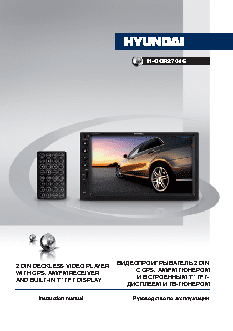
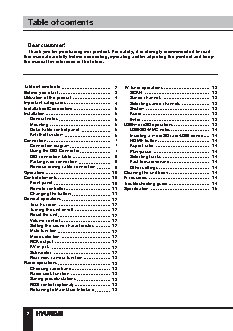
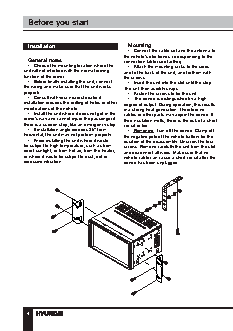
Руководство пользователя HYUNDAI H-CCR2701G. Основные функции, характеристики и условия эксплуатации изложены на 31 странице документа в pdf формате.
Доступно к просмотру 30 страниц. Рекомендуем вам скачать файл инструкции, поскольку онлайн просмотр документа может сильно отличаться от оригинала.
H-CCR2701G
2 DIN DECKLESS VIDEO PLAYER         ВИДЕОПРОИГРЫВАТЕЛЬ 2 DIN
WITH GPS, AM/FM RECEIVER                   С GPS, AM/FM ТЮНЕРОМ
AND BUILT-IN 7” TFT DISPLAY                И ВСТРОЕННЫМ 7” TFT-
ДИСПЛЕЕМ И TB-ТЮНЕРОМ
Instruction manual                Руководство по эксплуатации
Table of contents
Dear customer!
Thank you for purchasing our product. For safety, it is strongly recommended to read
this manual carefully before connecting, operating and/or adjusting the product and keep
the manual for reference in the future.
Table of contents               2   TV tuner operations            13
Before you start                3     SCAN                         13
Utilization of the product      4     Saved channels               13
Important safeguards            4     Selecting saved channels     13
Installation/Connection         5     System                       13
Installation                    5        Audio                     13
General notes                 6     Enter                        13
Mounting                      6   USB/microSD operations         13
Detachable control panel      6     USB/SD/MMC notes             14
Anti-theft system             6     Inserting a microSD card/USB device  14
Connection                      7     HOME button                  14
Connection diagram            7     Aspect ratio                 14
Using the ISO Connector       7     Play/pause                   14
ISO connection table          8     Selecting tracks             14
Parking wire connection       9     Fast forward/rewind          14
Reverse driving cable connection  9  Other settings              14
Operation                      10   Cleaning the unit body         14
Control elements               10   Accessories                    14
Front panel                  10   Troubleshooting guide          14
Remote controller            11   Specification                  15
Changing the battery         11
General operations             12
Touch screen                 12
Turning the unit on/off      12
Reset the unit               12
Volume control               12
Setting the sound characteristics  12
Mute function                12
Mode selection               12
RCA output                   12
AV in jack                   12
Subwoofer                    12
Rear view camera function  13
Radio operations               13
Choosing radio band          13
Radio seek function          13
Saving presets/stations      13
RDS control (optional)       13
Returning to Main User Interface  13
2
Table of contents
Utilization of the product
If you want to dispose this product, do not mix it with general household waste. There is
a separate collection system for used electronic products in accordance with legislation
that requires proper treatment, recovery and recycling.
Please contact your local authorities for the correct method of disposal. By doing so, you
will ensure that your disposed product undergoes the necessary treatment, recovery and
recycling and thus prevent potential negative effects on the environment and human health.
Important safeguards               and other components of the unit and can
result in an outage.
•   Disconnect the vehicle’s negative battery
•   Read carefully through the manual to
familiarize yourself with this unit.  terminal while mounting and connecting the
unit.
•   Keep this manual handy as a reference
for operating procedures and precautions. Do   •   The unit is designed for negative
not allow persons who have not read through   terminal of the battery, which is connected
to the vehicle metal. Please ensure it before
this manual to use this unit.
•   “CLASS 1 LASER PRODUCT”        installation.
This product contains a laser diode of   •   When replacing the fuse, be sure to use
higher class than 1. Laser beams from the   one with an identical amperage rating. Using a
optical pickup are dangerous to the eyes. To   fuse with a higher amperage rating may cause
ensure continued safety, do not remove any   serious damage to the unit.
covers or attempt to gain access to the inside   •   Do not allow the speaker wires to be
of the product. Refer all servicing to qualified   shorted together when the unit is switched
personnel.                          on. Otherwise it may overload or burn out the
•   Do not allow this unit to come into contact   power amplifier.
with liquids. Electrical shock could result. Also,   •   Make sure you disconnect the power
damage to this unit, smoke, and overheating   supply and aerial if you will not be using
could result from contact with liquids or dust.   the system for a long period or during a
Protect this unit from moisture.    thunderstorm.
•   Make sure that foreign objects do not get   •   Make sure you disconnect the power
inside the unit; they may cause malfunctions,   supply if the system appears to be working
or create safety hazards such as electrical   incorrectly, is making an unusual sound, has
shock or laser beam exposure.       a strange smell, has smoke emitting from it
•   The beginning of operation is the moment   or liquids have got inside it. Let a qualified
of the unit installation. Before use the device   technician check the system.
in winter it is recommended to heat up the   •   Always keep the volume low enough so
passenger compartment during 20 seconds or   that you can hear sounds from outside the
to the operation temperature.       vehicle.
•   Using the unit with the temperature that   •   Should this product fail to operate
goes beyond the operation temperature greatly   properly, contact your dealer or nearest service
decreases the operation resource of the screen   center.
3