На сайте 127211 инструкций общим размером 515.03 Гб , которые состоят из 6436472 страниц
Фото
Руководство пользователя LOEWE Individual Edition. Основные функции, характеристики и условия эксплуатации изложены на 69 страницах документа в pdf формате.
Доступно к просмотру 68 страниц. Рекомендуем вам скачать файл инструкции, поскольку онлайн просмотр документа может сильно отличаться от оригинала.
Operating instructions
TV
Individual Edition
233–32892.020
Contents
Remote control - TV functions                     3       Setting the PIP type                           24
Control unit                                      4     Operating modes – EPG                            25
Connections to rear panel                         5       Using the EPG                                  25
Welcome                                           6       Selecting providers and stations               26
26
Data capture
Integrated features                             6
Scope of delivery                               6     Operating modes – Teletext                       27
Transporting                                    6       Page selection with the coloured keys          27
Installation options                            6       Displaying teletext pages                      27
Note on the LCD screen                          7       Programme timer recordings                     28
Cleaning                                        7     Operating modes – Digital Recorder               29
Disposal                                        7       About the Digital Recorder system              29
Remove the protective foils                     7       Settings for the Digital Recorder              31
For your safety                                   8         Switching Digital Recorder continuous operation on/off   31
First installation                                9         Setting recording capacity/quality           31
Remote control                                  9       TV viewing with time shift                     33
Interruption
33
Connection                                      9         Switching to the live picture                33
Handling the fabric hose                       10         Fast forward and rewind                      34
Use of the binders                             10         Highlight function                           34
Using the common interface module              10       Archive recording                              36
Switching on                                   10         Immediate recording                          36
Automatic programming                          11         Timer recording                              37
Directing DVB-T antenna                        12         The Delete Manager                           39
Daily operation                                  12       Archive playback                               40
Switching on/off                               12         Call the DR archive                          40
Changing stations                              13         Setting bookmarks                            40
Basics about the menu operation                14         Playing highlights                           41
For the info system ...                        15         Slow motion                                  42
For the index ...                              16         Hiding sections of the recording             43
Setting the sound                              17         Deleting bookmarks                           43
Picture settings                               17         Copying recordings from the archive          44
Direct control on TV set                       17         Locking/unlocking a movie (parental lock)    45
Operating modes – TV                             18     Operating modes – Radio                          47
How the coloured keys work in TV mode          18     Operating additional equipment                   48
Show status display                            18       Login and connect equipment                    48
Calling the index                              18       Assignment of digital audio inputs and outputs   50
Call additional functions                      19       HDMI (DVI) connection                          53
Call timer overview                            19       VGA/XGA connection                             53
Select picture format                          19       Component video connection                     54
Move picture up/down                           19       Operating other Loewe devices with the RC3 remote control   55
TV menu                                        19       Rotating the TV set                            57
DVB subtitles                                  20
Removing the CI module                         21     What to do, if ...                               58
Inserting a new CI module                      21     Technical data                                   60
Installing new DVB software                    21       General data                                   60
Image+                                         22       Electrical data                                61
Operating modes – PIP                            23     Accessories                                      62
Selecting the station of the PIP picture       23     Service                                          63
Interchanging PIP picture/TV picture           23     Codelist RC3 / Lista de codigos RC3              64
Functions in the PIP menu                      24
- 2
Remote control - TV functions
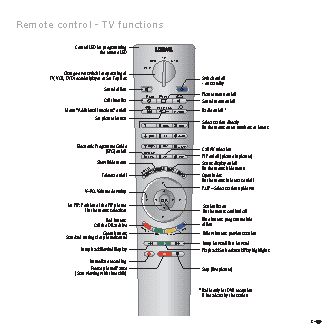
Control LED for programming
the remote LED
TV
DVD     STB
VCR
Change-over switch for operating of
TV, VCR, DVD recorder/player or Set Top Box            Switch on/off
- on standby
Sound off/on
Picture menu on/off
-Set  -List
Call timer list                     Sound menu on/off
REC-MENU                 (1
Menu "Additional functions" on/off      RADIO     Radio on/off
Set picture format
Select station directly
abc  def      /in the menu: enter numbers or letters
ghi  jkl  mno
Electronic Programme Guide  pqrs  tuv  wxyz
(EPG) on/off  DVD-AV               Call AV selection
EPG   AV   PIP      PIP on/off (picture in picture)
Show/hide menu                        Status display on/off
DISC-M                /in the menu: hide menu
Teletext on/off                     Open index
/in the menu: info texts on/off
P+
P+/P– Select station up/down
V–/V+ Volume down/up
V–   OK    V+
for PIP: Position of the PIP picture             Station list on
/ in the menu: select/set                 /in the menu: confirm/call
P–
Red button:                        Blue button: programme info
Call the DR archive                    off/on
Green button:  C-SET       CARD    Yellow button: previous station
Standard settings for picture/sound  SV  TITLE
Jump forward/Fast forward
Jump back/Rewind/Replay                     Playback/Set bookmark/Play highlights
Immediate recording
Freeze picture/Pause                    Stop (live picture)
(Start viewing with time shift)
(1  Radio only for DVB reception
if broadcast by the station
3 -