На сайте 127200 инструкций общим размером 514.99 Гб , которые состоят из 6435891 страницы
Фото
Руководство пользователя TELEFUNKEN TF-SRP3470B. Основные функции, характеристики и условия эксплуатации изложены на 13 страницах документа в pdf формате.
Доступно к просмотру 12 страниц. Рекомендуем вам скачать файл инструкции, поскольку онлайн просмотр документа может сильно отличаться от оригинала.
СТЕРЕОМАГНИТОЛА С BLUETOOTH®
PORTABLE STEREO BLUETOOTH® PLAYER
TF-SRP3470B
Instruction manual
Руководство по
эксплуатации
Instruction manual
Dear customer!
Thank you for purchasing our product. For safety, it is strongly recommended to read
this manual carefully before connecting, operating and/or adjusting the product and keep
the manual for reference in future.
Description
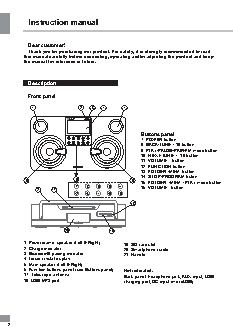
Front panel
1                2   3   4       1
CHARGE  PAIRING
Buttons panel
POWER  T  UNE -/ -10  PAIR/ FM MODE   UNE +/ +10  VOLUME +
T
7. POWER button
PLAY MODE
8. BACK/TUNE-/-10 button
FUNCTION  FOLDER-/ MEM-  PROGRAM  FOLDER+/ MEM+  VOLUME -
9. PLAY/PAUSE/PAIR/FM mode button
10. NEXT/TUNE+/+10 button
11. VOLUME + button
12. FUNCTION button
13. FOLDER-/MEM- button
14. STOP/PROGRAM buton
5                 6                   5   15. FOLDER+/MEM+/PLAY mode button
7   8   9   10  11      16. VOLUME - button
21    17
12  13  14  15  16
18
20               19
1. Piezoceramic speaker (Left & Right)  19. SD card slot
2. Charge indicator                 20. Smartphone cradle
3. Bluetooth® pairing indicator     21. Handle
4. Liquid crystal display
5. Main speaker (Left & Right)
6. Function buttons panel (see Buttons panel)  Not indicated:
17. Telescopic antenna              Back panel: headphone jack, AUX input, USB
18. USB MP3 port                    charging port, DC input (microUSB)
2
Instruction manual
Utilization of the product          •  Insert the microUSB plug of the AC
adaptor into the microUSB socket at the back
of the unit.
If you want to dispose of this product, do not   •  Plug the adaptor into the wall outlet.
mix it with general household waste. There is a   •  Press the POWER button on the unit to
separate collection system for used electronic   switch it on.
products in accordance with legislation that   •  The unit is charging if the charging LED
requires proper treatment, recovery and   indicator is on.
recycling.                           •  Normal operation time on full charge is 5-6
Please contact your local authorities for   hours.
the correct method of disposal. By doing so,   •  For best results, try to fully charge the
you will ensure that your disposed product   battery before each use. If the battery is
undergoes the necessary treatment, recovery   drained, please allow it to recharge for a few
and recycling and thus prevent potential   hours.
negative effects on the environment and   •  When the unit is not being used, we
human health.                       suggest keeping it plugged in and charging.
USB charging port
Important safeguards                •  This unit is equipped with a DC 5V USB
charging port on the back panel.
•  The instruction manual contains important   •  Connect the device you would like to
operating and maintenance instructions. For   charge (e.g. smartphone, tablet) with a
suitable USB cable (not included) into the USB
your safety, it is necessary to refer to the   charging port. This function is only active the
manual. Keep the manual for future use.  AC adaptor is plugged in.
•  Do not hit or drop the unit.
•  Do not expose the unit to vibration, direct   General operations
sunlight, too high or low temperatures or
humidity.
•  Do not disassemble the unit yourselves.   Sound control
Refer servicing to qualified service personnel  •  Adjusting loudness can be done by using
the volume control knob on this unit and also
All the illustrations in this manual are   the volume control of the device you have
schematic images, which may differ from   already connected to (if using Bluetooth or
actual objects.                     AUX-input).
If there is no sound, make sure the
Power supply                       volume on both devices is not set to 0.
Function button
•  The unit operates on internal rechargeable   Pressing the FUNCTION button repeatedly
Li-ion battery.                     will allow you to see and select one of the
•  The battery can be recharged from any   different source functions, as follows:
standard USB port (e.g. PC USB port).  Bluetooth => FM radio => USB => SD =>
•  It can also be recharged with the provided   AUX
microUSB AC adaptor. Before first plugging the   Bluetooth® wireless playback
appliance check that voltage indicated on the   •  This unit can wirelessly playback audio
rating label corresponds to the mains voltage in   from any device with Bluetooth® A2DP
your home.
3