На сайте 127169 инструкций общим размером 514.94 Гб , которые состоят из 6434810 страниц
Фото
Руководство пользователя HYUNDAI H-1442. Основные функции, характеристики и условия эксплуатации изложены на 11 страницах документа в pdf формате.
Доступно к просмотру 10 страниц. Рекомендуем вам скачать файл инструкции, поскольку онлайн просмотр документа может сильно отличаться от оригинала.
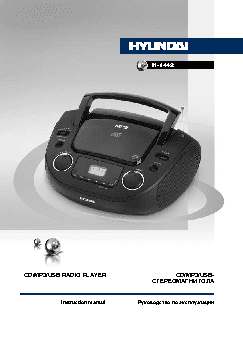
H-1442
CD/MP3/USB RADIO PLAYER                               CD/MP3/USB-
СТЕРЕОМАГНИТОЛА
Instruction manual          Руководство по эксплуатации
Instruction manual                                                                                                        Instruction manual
Dear customer!
Thank you for purchasing our product. For safety, it is strongly recommended to read
this manual carefully before connecting, operating and/or adjusting the product and keep
the manual for reference in future.
Description
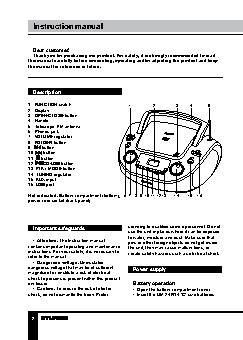
1.  FUNCTION switch                  1       2       3     4     5
2.  Display
3.  OPEN/CLOSE button
4.  Handle
5.  Telescopic FM antenna
6.  Phones jack
7.  VOLUME regulator
8.  FOLDER button
9.     button
10.    button
11.   button
12.   CD/USB button
13. PLAY MODE button
14. TUNING regulator
15. AUX input
16. USB port
Not indicated: Battery compartment (bottom),  6 7 8 9 10 11 12 13  14  15  16
power cord socket (back panel)
Important safeguards              servicing to qualified service personnel. Do not
use the unit in places where it can be exposed
to water, moisture and dust. Make sure that
•  Attention: The Instruction manual   pins or other foreign objects do not get inside
contains important operating and maintenance   the unit; they may cause malfunctions, or
instructions. For your safety, it is necessary to   create safety hazards such as electrical shock.
refer to the manual.
•  Dangerous voltage: Uninsulated
dangerous voltage that may be of sufficient   Power supply
magnitude to constitute a risk of electrical
shock to persons is present within this product
enclosure.                            Battery operation
•  Caution: To reduce the risk of electric   •  Open the battery compartment cover.
shock, do not dismantle the body. Prefer   •  Insert 8 x UM-2/LR14 “C” size batteries.
2                                                                                                                                                  3
Instruction manual                                Instruction manual
Please observe correct battery polarities or the   Headphone jack
set will not work.
•  Close the battery compartment cover.
•  For private listening, insert 3.5-mm
headphone into the stereo headphone jack.
AC operation                        •  Adjust volume to the appropriate level as
•  Before the first connecting of the appliance   desired.
check that voltage indicated on the rating label   •  When the stereo headphone jack is
corresponds to the mains voltage in your home.  plugged, speaker will disconnect automatically.
•  Plug the corresponding end of cord into
the AC socket on the rear of the set.
•  Insert the plug into power supply.  Radio operations
Caution:
•  When the set is only used with AC or is
not used for 2 weeks or more, please remove   •  Set FUNCTION switch to AM or FM position.
the batteries, to avoid damage to the set from   •  Rotate TUNING regulator to tune to the
leakage of batteries.               desired station.
•  Always switch off the unit when not in use.  •  To turn off the radio, set FUNCTION
•  Always unplug the appliance from power   switch to a different position.
supply, when no use long time.
Antenna
•  For FM reception, adjust the telescopic
General operations                antenna appropriately to obtain the best
reception on the band selected.
•  The AM signal is picked up through the
•  To select the needed sound source set
FUNCTION switch to the corresponding   built-in antenna. The set should be placed to a
position (CD/USBAUX IN/FM/AM).      position for the best reception.
•  Adjust the sound volume level by rotating
VOLUME regulator.
CD/MP3 operations
AUX in jack                         Inserting discs
•  Set FUNCTION switch to CD/USB
You can connect the audio output of an   position. The display becomes active.
external device (such as a CD-player) to   •  Open the CD door by pressing OPEN/
this unit, to listen to the sound of that device   CLOSE button on the CD compartment cover.
through the amplifier of this unit.  Put a CD into the CD compartment with the
•  To connect an external audio device (eg.   label side upwards and close the CD door.
MP3 player), please use a standard stereo
cable (not included) with 3.5 mm to 3.5 mm   Connecting USB devices
plugs to connect the headphone out or audio   •  Set FUNCTION switch to CD/USB position.
line-out of the external device to the AUX input   •  Insert a USB device into the USB slot.
socket of this unit.                  •  Press and hold   CD/USB button.
•  Slide FUNCTION switch to AUX IN position.  •  All other operations for USB are the same
•  Turn on the external device.   as for disc playback.
•  Maximum supported capacity for USB
is 32 Gbs. FAT/FAT32/NTFS file systems are
2                                                                          3