На сайте 127179 инструкций общим размером 514.95 Гб , которые состоят из 6434956 страниц
Фото
Руководство пользователя HYUNDAI H-1502. Основные функции, характеристики и условия эксплуатации изложены на 7 страницах документа в pdf формате.
Доступно к просмотру 7 страниц. Рекомендуем вам скачать файл инструкции, поскольку онлайн просмотр документа может сильно отличаться от оригинала.
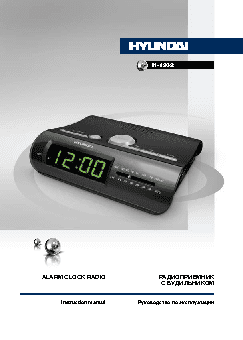
H-1502
ALARM CLOCK RADIO                         РАДИОПРИЕМНИК
С БУДИЛЬНИКОМ
Instruction manual          Руководство по эксплуатации
Instruction manual                                                                                                        Instruction manual
Dear customer!
Thank you for purchasing our product. For safety, it is strongly recommended to read this
manual carefully before connecting, operating and/or adjusting the product and keep the manual
for reference in future.
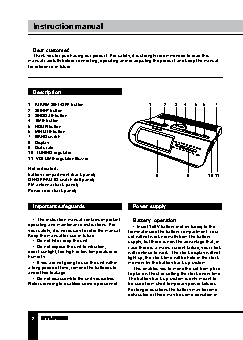
Description
1.  ALARM SET/OFF button                    1    2   3  4   5  6   7
2.  SLEEP button
3.  SNOOZE button
4.  TIME button
5.  HOUR button
6.  MINUTE button
7.  BAND switch
8.  Display
9.  Dial scale
10. TUNING regulator
11. VOLUME regulator/Buzzer
Not indicated:
battery compartment (back panel)              8          9       10 11
ON/OFF/AUTO switch (left panel)
FM antenna (back panel)
Power cord (back panel)
Important safeguards                Power supply
•  The instruction manual contains important   Battery  operation
operating and maintenance instructions. For   •  Insert 1x9V battery (not included) to the
your safety, it is necessary to refer the manual.   terminal inside the battery compartment. Your
Keep the manual for use in future.  set will not work normally from the battery
•  Do not hit or drop the unit.   supply, but there is now the advantage that, in
•  Do not expose the unit to vibration,   case there is a mains current failure, your clock
direct sunlight, too high or low temperature or   will continue to work. The clock display will not
humidity.                           light up, the clock time will be held in the clock
•  If you are not going to use the unit within   memory by the battery back-up system.
a long period of time, remove the batteries to   This enables you to move the set from place
avoid their leakage.                to place without re-setting the clock every time.
•  Do not disassemble the unit yourselves.   The battery back-up system is only meant to
Refer servicing to qualified service personnel.  be used from short temporary power failures.
For longer durations the battery may become
exhausted or there may be some deviation in
2                                                                                                                                                  3
Instruction manual                                Instruction manual
accuracy.                           reception.
•  When the battery is exhausted, it should   Sleep to music
be removed from the set to prevent leakage.   The radio can be set to play and to switch
If you do not wish to take advantage of the   off automatically after a preset time. Minimal
battery back-up system, your set will work   time is 1 minute, maximal period is  1 hour 59
normally without a battery. However, if   minutes.
disconnected from the mains, the clock figures   •  SlideON/OFF/AUTO switch to AUTO
will flash when the mains are re-connected and   position.
you must re-set the clock.            •  To set for a desired period of sleep, press
AС operation                      and hold SLEEP button and, without releasing
•  The appliance is for household use only.  it, press MINUTE button to set the desired
•  Before the first connecting of the unit   period of the sleep time.
check that voltage indicated on the rating label   •  If you want to turn off the radio before sleep
corresponds the mains voltage in your home.  time expires, press SNOOZE button.
•  Insert the plug into the power supply.
•  The set is now working as an electronic
clock. Figures will blink on the display showing   Alarm operation
that clock should be set.
Setting the alarm
Setting the clock                   •  SlideON/OFF/AUTO switch to AUTO
position.
•  Press and hold ALARM SET/OFF button.
•  Press and hold TIME button.      •  Without releasing ALARM SET/OFF
•  Do not release TIME button; press HOUR   button, press HOUR button and MINUTE
button or MINUTE button to set the clock   button to set the desired wake up time.
display to the correct time.          •  Release ALARM SET/OFF button to show
•  Release all the buttons when finished the   the current time.
setting.                              •  The radio will play automatically at the
preset time. To switch the alarm off, press
ALARM SET/OFF button.
Radio operation                     •  The preset wake up time will be saved
in the memory of the unit, and the alarm will
Tuner operations                  sound at the same time next day.
•  Slide ON/OFF/AUTO switch to ON position.  Alarm sound setting
•  Slide BAND switch to AM or FM position to   Follow the steps of “Setting the alarm” and
select the needed band.             set VOLUME regulator to Buzzer position. You
•  Use VOLUME regulator to adjust volume   will be awakened by the buzzer alarm. The
level.                              buzzer can be switched by pressing ALARM
•  Adjust the program using TUNING   SET/OFF button, or you can switch the buzzer
regulator.                          to radio by setting ON/OFF/AUTO switch to ON
Antenna                           position.
•  For AM reception, the unit is equippped   Snooze control
with a built-in sensitive ferrite antenna.  When the alarm is on, press SNOOZE button
•  For FM reception, the unit is equipped with   once, after approximately 9 minutes the alarm
an external wire antenna. Be sure to untwist   will be on again.
the antenna to its fullest length for a better
2                                                                          3