На сайте 127097 инструкций общим размером 514.67 Гб , которые состоят из 6431691 страницы
Фото
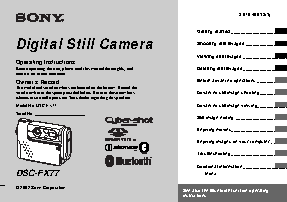

Руководство пользователя SONY Cyber-Shot DSC-FX77. Основные функции, характеристики и условия эксплуатации изложены на 116 страницах документа в pdf формате.
Доступно к просмотру 113 страниц. Рекомендуем вам скачать файл инструкции, поскольку онлайн просмотр документа может сильно отличаться от оригинала.
3-078-409-12(1)
Getting started ________________________
Digital Still Camera                                             Shooting still images __________________
Viewing still images ___________________
Operating Instructions
Before operating the unit, please read this manual thoroughly, and   Deleting still images ___________________
retain it for future reference.
Owner’s Record                                                   Before advanced operations _____________
The model and serial numbers are located on the bottom. Record the
serial number in the space provided below. Refer to these numbers   Advanced still image shooting____________
whenever you call upon your Sony dealer regarding this product.
Model No. DSC-FX77                                               Advanced still image viewing_____________
Serial No.
Still image editing ______________________
Enjoying movies________________________
Enjoying images on your computer _______
Troubleshooting________________________
Additional information ___________________
DSC-FX77                                                            Index
© 2002 Sony Corporation
See also the Bluetooth function operating
instructions.
Notice
WARNING                                                        “Memory Stick” and battery
If static electricity or electromagnetism causes   pack
To prevent fire or shock hazard, do   data transfer to discontinue midway (fail),
not expose the unit to rain or   restart the application or disconnect and
moisture.                       connect the USB cable again.
N50
Notice on the supplied AC
power adaptor for the
customers in the United
Kingdom
A moulded plug complying with BS 1363 is   Hereby, Sony Corporation, declares that this
fitted to this equipment for your safety and   digital still camera is in compliance with the
convenience.                    essential requirements and other relevant
Should the fuse in the plug supplied need to be   provisions of the Directive 1999/5/EC. For
replaced, a 5 AMP fuse approved by ASTA or   details, please access the following URL:
BSI to BS 1362, (i.e., marked with    or     http://www.compliance.sony.de/
mark) must be used.
The Bluetooth function is intended to be used
If the plug supplied with this equipment has a   in the following countries or areas: Austria,
detachable fuse cover, be sure to attach the   Belgium, Denmark, Finland, France,
fuse cover after you change the fuse. Never   Germany, Greece, Ireland, Italy, Luxembourg,
use the plug without the fuse cover. If you   Netherlands, Norway, Portugal, Spain,
should lose the fuse cover, please contact your   Sweden, Switzerland, United Kingdom.
nearest Sony service station.
For the Customers in other
countries
For the Customers in Europe
The Bluetooth function is intended to be used
This product has been tested and found
in the following countries or regions:
compliant with the limits sets out in the   Australia, Hong Kong, New Zealand,
R&TTE Directive for using connection cables
Singapore.
shorter than 3 meters.
Attention
The electromagnetic fields at the specific
frequencies may influence the picture and
sound of this digital camera.
2
Before using your camera
Trial recording                 Do not shake or strike the camera   Do not get the camera wet
Before you record one-time events, you may   In addition to malfunctions and inability to   When taking pictures outdoors in the rain or
want to make a trial recording to make sure   record images, this may render the “Memory   under similar conditions, be careful not to get
that the camera is working correctly.  Stick” unusable or image data breakdown,   the camera wet. If moisture condensation
damage or loss may occur.      occurs, see page 103 and follow the
No compensation for contents of the                            instructions on how to remove it before using
recording                       LCD screen, LCD finder (only models   the camera.
Contents of the recording cannot be   with a LCD finder) and lens
compensated for if recording or playback is   • The LCD screen and the LCD finder are   The pictures used in this manual
not possible due to a malfunction of your   manufactured using extremely high-  The photographs used as examples of pictures
camera or recording medium, etc.  precision technology so over 99.99% of the   in this manual are reproduced images, and are
pixels are operational for effective use.   not actual images shot using this camera.
Back up recommendation          However, there may be some tiny black
To avoid the potential risk of data loss, always   points and/or bright points (white, red, blue   Do not aim the camera at the sun or
copy (back up) data to a disk.  or green in color) that constantly appear on   other bright light
the LCD screen and the LCD finder. These   This may cause irrecoverable damage to your
Notes on image data compatibility   points are normal in the manufacturing   eyes.
• This camera conforms with the Design rule   process and do not affect the recording in
for Camera File system universal standard   any way.
established by the JEITA (Japan Electronics   • Be careful when placing the camera near a
and Information Technology Industries   window or outdoors. Exposing the LCD
Association).                  screen, the finder or the lens to direct
• Playback of images recorded with your   sunlight for long periods may cause
camera on other equipment and playback of   malfunctions.
images recorded or edited with other   • Close the lens portion when not using the
equipment on your camera are not   camera.
guaranteed.
Precaution on copyright
Television programs, films, video tapes, and
other materials may be copyrighted.
Unauthorized recording of such materials may
be contrary to the provision of the copyright
laws.
4