На сайте 126980 инструкций общим размером 514.17 Гб , которые состоят из 6426658 страниц
Фото
Руководство пользователя LOGITECH Wireless Solar Keyboard K750 USB (920-002938). Основные функции, характеристики и условия эксплуатации изложены на 63 страницах документа в pdf формате.
Доступно к просмотру 63 страницы. Рекомендуем вам скачать файл инструкции, поскольку онлайн просмотр документа может сильно отличаться от оригинала.
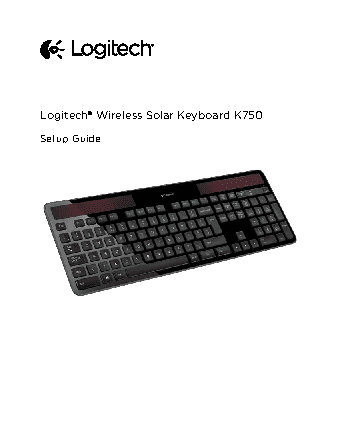
Logitech® Wireless Solar Keyboard K750
Setup Guide
Logitech Wireless Solar Keyboard K750
English                                                                                                                                                                             3
По-русски                                                                                                                                                                           7
Magyar                                                                                                                                                                             11
Ceska verze                                                                                                                                                                   15
Po polsku                                                                                                                                                                       19
Eesti                                                                                                                                                                                23
Latviski                                                                                                                                                                          27
Lietuviu                                                                                                                                                                          31
Hrvatski                                                                                                                                                                          35
Srpski                                                                                                                                                                            39
Slovenscina                                                                                                                                                                   43
Slovencina                                                                                                                                                                     47
Romana                                                                                                                                                                          51
Български                                                                                                                                                                         55
Українська                                                                                                                                                                       59
www logitech com/support?                                                                                                                              63
2
Logitech Wireless Solar Keyboard K750
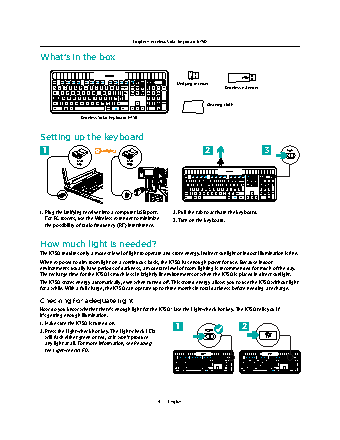
What’s in the box
Unifying receiver
Wireless extender
Cleaning cloth
Wireless Solar Keyboard K750
Setting up the keyboard
1                                                          2                    3
USB               USB
1. Plug the Unifying receiver into a computer USB port.   2. Pull the tab to activate the keyboard.
For PC towers, use the Wireless extender to minimize   3. Turn on the keyboard.
the possibility of radio frequency (RF) interference.
How much light is needed?
The K750 requires only a modest level of light to operate and store energy. Indirect sunlight or indoor illumination is fine.
When exposed to dim room light on a continuous basis, the K750 has enough power for use. Because indoor
environments usually have periods of darkness, a moderate level of room lighting is recommended for much of the day.
The recharge time for the K750 is much less in brightly lit environments or when the K750 is placed in direct sunlight.
The K750 stores energy automatically, even when turned off. This stored energy allows you to use the K750 without light
for a while. With a full charge, the K750 can operate up to three months in total darkness before needing a recharge.
Checking for adequate light
How do you know whether there’s enough light for the K750? Use the Light-check hot key. The K750 tells you if
it’s getting enough illumination.
1. Make sure the K750 is turned on.              1                       2
2. Press the Light-check hot key. The Light-check LED
will flash either green or red, or it won’t produce
any light at all. For more information, see Reading
the Light-check LED.
3??English